

Data Interpretation tests whether you can read before you calculate. Numeric Entry tests whether you can type exactly what’s asked. One invented chart lets us practise both.
How a set works
A Data Interpretation set is a group of questions on one shared table, graph or other display. Questions in a set can be select one, select one or more, or Numeric Entry, but never Quantitative Comparison.
ETS’s advice comes down to three habits:
- Scan the display to see what it’s about, without studying every detail.
- Check the axes and scales, the units in titles and labels, and any notes. Watch for broken scales and bars that don’t start at 0.
- Answer from the data, everyday facts and maths, never from what you happen to know about the subject.
Data graphics are drawn to scale, so you may estimate by eye. That’s unlike geometric figures.
A worked set
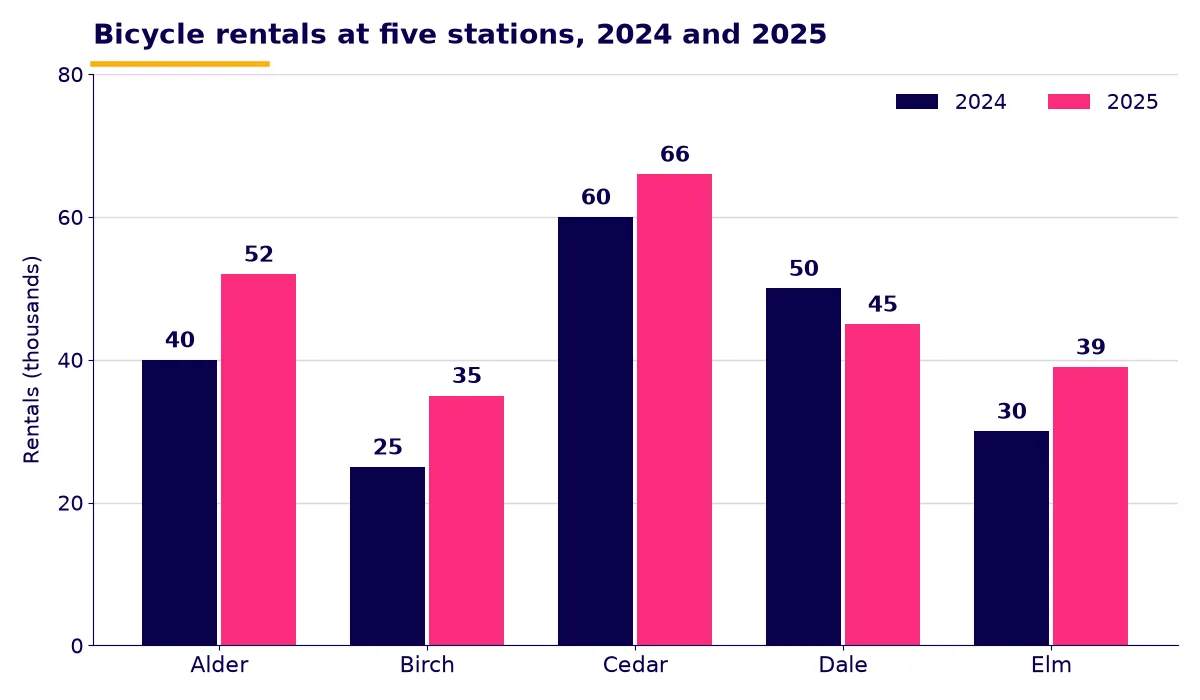
Note the unit before anything else: rentals are in thousands.
1. Select one. Which station had the greatest percent increase from 2024 to 2025?
Alder gained most in count, 12, and that’s the trap. A percent needs the starting value: Alder 12 / 40 = 30%, Birch 10 / 25 = 40%, Cedar 6 / 60 = 10%, Elm 9 / 30 = 30%. Dale fell. The answer is Birch.
2. Numeric Entry, with a % sign after the box. To the nearest whole percent, what share of 2025 rentals was at Cedar?
The 2025 total is 52 + 35 + 66 + 45 + 39 = 237. Then 66 / 237 = 0.2785, or 27.85%. Enter 28. Because the % sign is already there, 0.28 would be wrong.
3. Numeric Entry, fraction boxes. Dale’s 2024 rentals were what fraction of Cedar’s 2024 rentals?
Enter 50 over 60. You don’t need to reduce it, so 5 over 6 is also right.
4. Select one or more. At which stations did rentals rise by more than 20%?
From question 1, Alder, Birch and Elm. Cedar rose by only 10%, and Dale fell. All three must be selected to earn credit.
5. Numeric Entry, with “rentals” after the box. By how many did total rentals rise from 2024 to 2025?
The 2024 total is 40 + 25 + 60 + 50 + 30 = 205, and 237 – 205 = 32. But the chart is in thousands, so enter 32000.
The Numeric Entry rules
| Situation | What to do |
|---|---|
| One box | Enter an integer or a decimal |
| Negative answer | Type a hyphen first: a fall of 5 at Dale is -5 |
| Decimal point | Use a period. Equivalent forms all count, so 2.5 and 2.50 are both right |
| No rounding instruction | Give the exact answer |
| Rounding instruction | Round only as told, and only at the end |
| Label next to the box | It’s part of the question. A % sign means 28, not 0.28 |
| Two boxes (a fraction) | Integers only, with no decimal point. A negative sign can go in either box. No need to reduce |
| Transfer Display | Works only with a single box. You must still fix rounding or percent form yourself |
ETS’s convention for halfway values matters here. A positive number rounds up, so 27.5 becomes 28. A negative number goes to the lesser value, so -12.5 becomes -13.
A routine for each question
- Read the question and pick out the unit it wants.
- Find only the bars or rows you need.
- Estimate. For question 2, 66 out of about 240 is a little over a quarter.
- Calculate on the on-screen calculator, then compare with your estimate.
- Reread the box and its label, then type.
More small errors of this kind are in GRE common mistakes, and the twelve-week GRE study plan shows where data analysis fits in your weeks.
Quick FAQ
Do I have to answer the questions in a set in order?
No. You can move freely within a section, so start with whichever question you find easiest.
Can I get a Numeric Entry question right with a rounded answer?
Only if the question tells you to round. Otherwise enter the exact value.
Official sources
GRE is a trademark of ETS. Prepspire is independent and not affiliated.